Mobile App Screen Layout
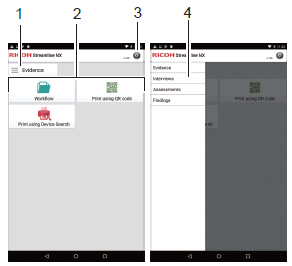
The following items and functions are displayed on the home screen of the RICOH Streamline NX for User app.
-
Group button
This displays the workflow group list.
-
Workflow display area
This area displays the workflows for the selected group and the print-related tasks available. For delivery, refer toDeliver Images from a Mobile Device
For printing, refer to Release Secure Print Documents.
-
Settings button
This displays the default settings screen of the SLNX mobile app. For details, refer toMobile App Configuration Settings
-
Group list
Select a group. When you select a group, a list of workflows in the group is displayed on the home screen.
