Configure the Printer Authentication
Contact the administrator to determine whether or not you need to configure the authentication information on the printer.
If you will configure the authentication information each time you perform printing, you do not need to configure the authentication information on the printer in advance.
This task describes the procedure using Universal Print Driver operations as an example. The actual procedure may vary depending on the type of printer driver.
-
Right-click the icon of the printer added in Register a Shared Printer and select [Printing preferences].
-
On the [Job Setup] menu under the [Detailed Settings] tab, select [Normal Print].
On the [Job Type] setting of the printer, [Normal Print] is the only supported setting.
-
Click [Authentication...].
-
Enter the information required for authentication, and click [OK].
-
Click [OK].
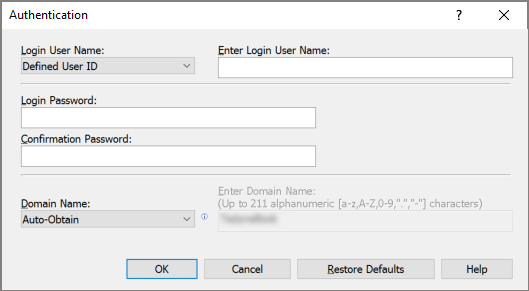
For details about the information required for authentication, contact the system administrator.
When printing from an application, configure the printing preferences and authentication information on the [Printer Properties] window of the printer.
