Device Status Monitoring Workflow
With SLNX, you can monitor the status of devices over a network. You can obtain information such as the current device status, various logs, and the remaining amount of consumables from the devices that are being monitored.
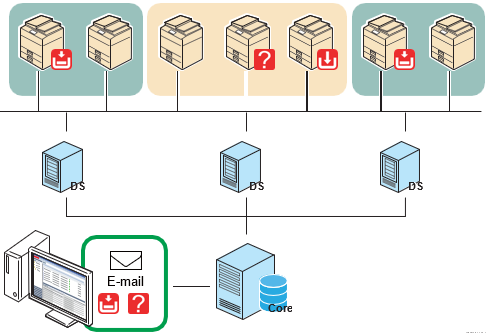
As depicted in the diagram below, you can also receive a notification via e-mail and have a program executed if a device error occurs or a device status changes. In addition, you can collect logs of these events.
|
Order |
Configuration Task |
Notes |
|---|---|---|
|
|
Configure the access account to enable SLNX to obtain information from devices or apply settings to devices. Use the access account that is registered to SLNX to search for devices in a network, and then add the discovered devices to the device list. |
|
|
|
Devices are automatically grouped by IP address, host name, manufacturer, or model. You can also organize devices into categories or groups manually, such as by floor or department. Group devices by the installation locations or organizational units for easier device management. |
|
|
|
By obtaining the device information and monitoring devices regularly, you can track the device status and be notified when errors occur and when the amount of consumables is low. |
|
|
|
You can receive a notification by e-mail when the status of a device changes or any new device is detected. |
|
|
|
Device logs are collected for tracking and understanding the operational status of the devices. |
|
|
|
You can change the energy saver mode of a device according to a configured schedule. For example, you can configure a schedule on a device to enter the energy saver mode at 7:00 PM every night and recover from the energy saver mode at 6:00 AM every morning. |
You can use the Configuration Wizard to display the configuration screens from the Management Console. Refer to Getting Around the Management Console.
