Embedded Device Functions Workflow
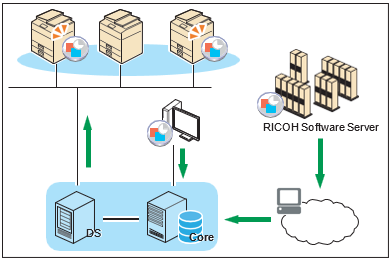
Use SLNX to manage the applications used for advanced device functions. As depicted in the diagram below, you can upload the Embedded Applications to the SLNX server, and then install them on a device, or download the latest version of an application from the server and update the applications on the device.
|
Order |
Configuration Task |
Notes |
|---|---|---|
|
|
A template is a standard file that contains the setting values to be applied to a device. Specify the type of extended application to be applied to the device and the method of obtaining the Embedded Applications. For details, see the following: |
|
|
|
Register the schedule, method, and target device to which to apply the created template as tasks. A template can be executed only after it is registered as a task. There are several types of tasks each with a different purpose. |
Configuration templates are very effective when used in combination with discovery tasks. For example, if you run a scheduled task that discovers new devices, then run a task that automatically moves the new devices to a particular category or group (based upon defined characteristics), you can then run a task that automatically applies a Standard Device Preferences template to the discovered devices. The template can contain location-specific information such as SMTP server address, LDAP server address and global fleet-specific settings. The template can also contain device function settings (print, scan, fax, copy), etc.